How Planned Intervention Works in the Helpdesk Module of Odoo 18 (Enterprise)
In Odoo 18 Enterprise, the Planned Intervention feature in the Helpdesk module helps organizations manage on-site support, scheduled maintenance and field interventions efficiently. It allows helpdesk teams to plan tasks, assign technicians and track service execution directly from helpdesk tickets.
This blog explains how Planned Intervention works and how to configure and use it in Odoo 18 Enterprise.What is Planned Intervention in Odoo Helpdesk?
Planned Intervention is used when:
* Customer issues require on-site visits
* Support tasks must be scheduled in advance
* Technicians need clear task assignments
* Service time and resources must be tracked
It bridges Helpdesk, Project and Timesheets to ensure smooth execution.
Prerequisites
Before using Planned Intervention, ensure:
* Helpdesk module is installed* Project module is installed
* Timesheets module is installed (recommended)
* User has access to helpdesk and project features
Step 1: Configure Helpdesk Team for Planned Intervention
* Navigate to Helpdesk → Configuration → Helpdesk Teams

* Open the required team
* Enable: Timesheets & Field Services


* Each planned intervention will now create a task under the selected project.
Step 2: Create or Open a Helpdesk Ticket
* Go to Helpdesk → Tickets
* Create a New Ticket
Enter:
* Customer details
* Issue description
* Helpdesk team
This ticket will act as the base for planning the intervention.
Step 3: Plan an Intervention from the Ticket
* Open the helpdesk ticket
* Click the Plan Intervention button

* A task form opens automatically
* Configure:
* Title
* Project
* Worksheet Template
* Customer
* Click the Create & View Task button.

Step 4: Execute the Planned Intervention
* Assigned technician receives the task* Technician performs the on-site or scheduled work
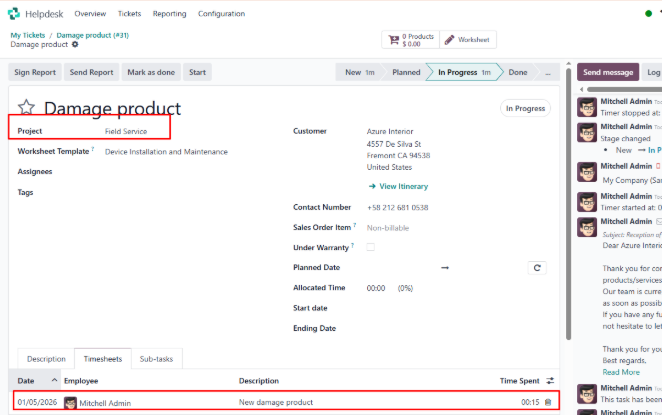
* Time spent is logged using timesheets
* Task status is updated (In Progress → Done)


In the timesheet, we can track how much time was spent on the task we created.
Step 5: Track Intervention Status
From the helpdesk ticket, you can:
* Check planned vs actual time
* Monitor technician progress
* Ensure SLA compliance
Step 6: Invoice the Intervention (Optional)
If the intervention is billable:
* Link a service product to the ticket or task
* Use timesheets or delivered quantity for billing
* Create invoice from the related sales order
* This ensures accurate billing for intervention services.
Business Use Cases
* On-site hardware repair
* Network installation
* Preventive maintenance
* Customer training sessions
* Field-level technical support
Benefits of Planned Intervention in Odoo 18
* Centralized support and intervention tracking
* Improved technician scheduling
* Accurate time and cost tracking
* Seamless integration with billing
* Better customer satisfaction
Conclusion
Planned Intervention in the Helpdesk module of Odoo 18 Enterprise enables businesses to efficiently manage scheduled support activities. By linking helpdesk tickets with project tasks, Odoo ensures better planning, execution and billing of service interventions.
This feature is ideal for companies providing field service, maintenance or on-site support.